How to Record Consignment Stock So Nothing Goes Missing at Your Stores
In consignment, your goods are spread across many stores and remain yours until they sell. So when the records get messy, what you lose isn't just a number — it's money. A cake that was sold but never recorded is never billed, and a pack of chips damaged on a store's shelf is never replaced.
The good news is that recording it isn't complicated. All it takes is four events, always recorded the same way.
The four events to record
1. When you deliver goods to a store
Every time stock leaves your warehouse for a store, record:
- the delivery date and the store,
- each product and its quantity,
- the agreed selling price (and the commission, if it differs by store).
Make a consignment note in duplicate and have the store sign it. That note is your proof the goods are now on their shelf.
2. When the store reports sales
At the end of each period (weekly or monthly), record how much of each product sold. Don't record only the money — record the quantities. The stock left at the store is calculated from those quantities.
3. When goods are withdrawn or written off
Products close to expiry, damaged or not selling are often taken back. Record them, with the reason. Without that record, your books will think those goods are still at the store.
4. When the store pays
Record the date, the amount and how it was paid (cash, bank transfer and so on), and mark which sales report it settles.
The formula for stock at a store
From those four records, the stock left at each store is:
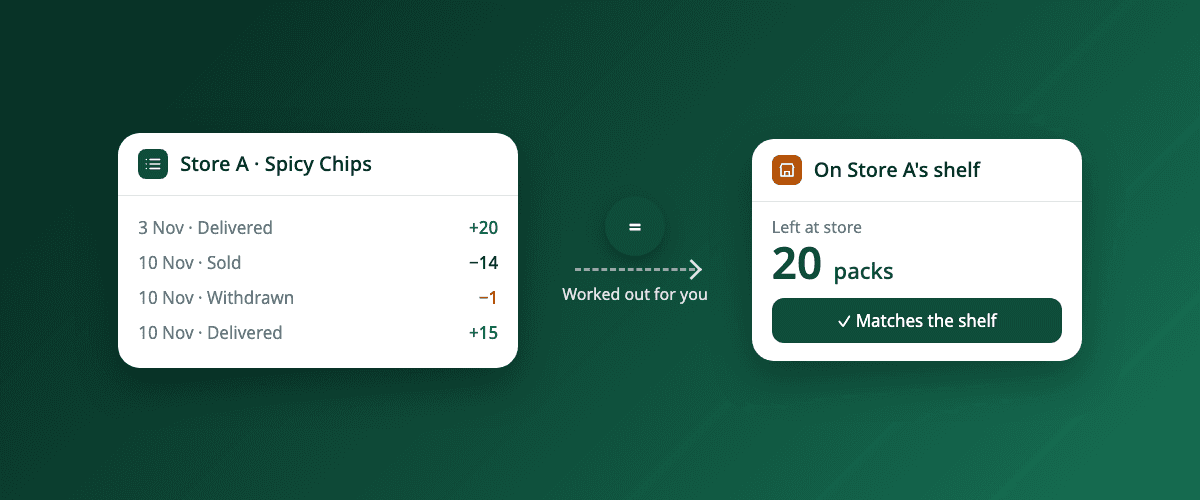
Stock at the store = previous stock + new delivery − sold − withdrawn
On each visit, count what is actually on the shelf and compare it with this number. A difference means stock was lost, damaged, or sold but not reported — and that is a conversation to have with the store before you bill, not after.
A worked example
Say you consign spicy chips to Store A at a selling price of Rp10,000 a pack:
| Date | Event | Qty | Left at store |
|---|---|---|---|
| 3 Nov | Delivered | 20 | 20 |
| 10 Nov | Sold (reported) | 14 | 6 |
| 10 Nov | Withdrawn (damaged pack) | 1 | 5 |
| 10 Nov | Delivered | 15 | 20 |
On 10 November you bill the store for 14 packs: 14 × Rp10,000 = Rp140,000, less the agreed commission. One damaged pack is withdrawn and recorded, then you add 15 packs so the shelf is back to 20.
Notice that one store and one product already produced four rows in a week. With 10 stores and 20 products, that becomes hundreds of rows every week.
The most common mistakes
- Recording money instead of goods. A rupiah total can't tell you how many packs are left at Store A.
- Forgetting to record withdrawals. Goods already taken back still look like they're at the store, so your stock count is always higher than reality.
- One book for every store. Separate records per store are far easier to match against the shelf and against the bill.
- Store-specific prices that aren't written down. If Store B gets a bigger commission, its bill is different too — and that has to be on record.
A notebook, a spreadsheet or an app?
For one or two stores, a notebook or spreadsheet is enough — as long as the four events above are recorded with discipline. Problems start as the number of stores grows: spreadsheet formulas break, file versions fork, and working out each store's bill takes hours.
Melacak is built for exactly this. Every delivery adds stock at the destination store, every sales report deducts it and works out the bill with its commission, and damaged or expired goods at a store are recorded with a Stock Write-off. The stock left at every store is always visible, without adding anything up.
Try Melacak free — record it once, and let the system do the arithmetic.